Quick answer: For most sellers today, EPUB is the right default — it’s the format Amazon KDP now recommends and automatically converts for Kindle, and it’s the only format accepted natively by Apple Books, Kobo, Google Play Books, and Barnes & Noble. PDF is the better choice specifically when your layout needs to stay fixed exactly as designed — workbooks, guides with diagrams, or anything image-heavy — and it’s the simplest option for selling directly from your own site or a marketplace like Etsy or Gumroad. MOBI, meanwhile, is effectively obsolete: Amazon discontinued MOBI uploads years ago, and there’s no practical reason to create a new MOBI file in 2026. If you’re only picking one format to sell, EPUB or PDF will cover nearly every situation; MOBI can be safely ignored.
That’s the short version if you just needed a direction. The reasoning behind it matters too, though, especially since a lot of older advice online still talks about MOBI as if it’s required for Kindle — which hasn’t been true for years. Here’s the fuller picture.
What Each Format Actually Is
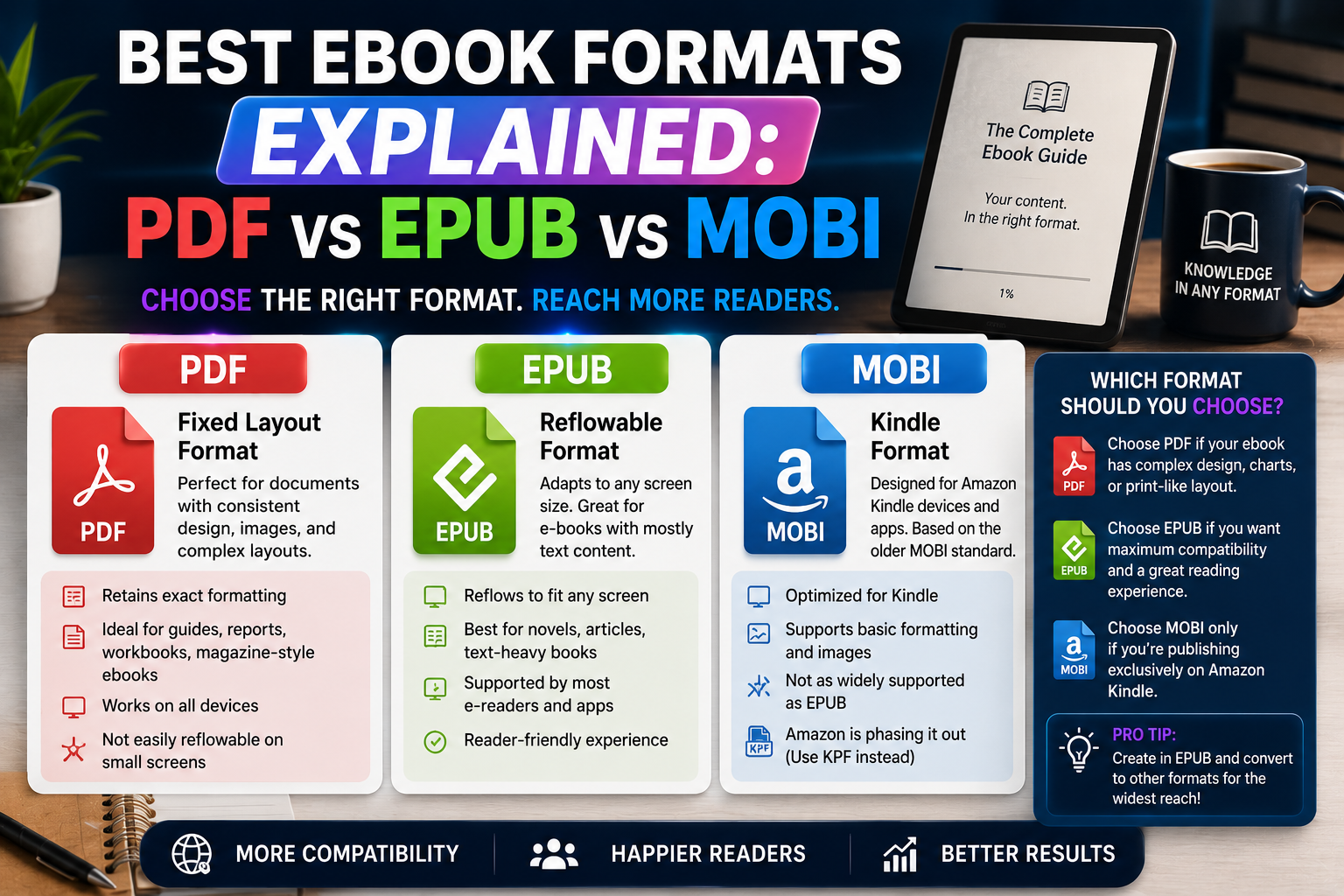
PDF (Portable Document Format) locks in an exact, fixed layout — the same page looks identical no matter what device opens it. This makes it excellent for anything where the visual arrangement of content matters: diagrams, tables, sheet music, workbooks with specific page layouts, or heavily designed guides. The tradeoff is that PDFs don’t reflow — meaning text doesn’t automatically resize or rewrap to fit a smaller screen, so reading a standard PDF on a phone or small e-reader often means constant zooming and scrolling.
EPUB (Electronic Publication) is an open standard built on the same underlying technology as web pages (HTML and CSS), which is exactly why it behaves so differently from a PDF. Instead of a fixed page, EPUB content reflows — text automatically resizes and rewraps to fit whatever screen it’s displayed on, from a phone to a tablet to a dedicated e-reader. This makes it the far more comfortable format for straightforward reading, and it’s why nearly every ebook retailer other than a print-style workbook defaults to it.
MOBI (Mobipocket) was originally Amazon’s proprietary Kindle format, but it’s now a legacy format in every practical sense. Amazon discontinued MOBI uploads to Kindle Direct Publishing years ago, replacing it with EPUB as the recommended submission format (which Amazon then automatically converts internally to its own AZW3/KFX formats for actual Kindle devices). Unless you’re dealing with an old file someone else already created, there’s no reason to generate a new MOBI file today.
Why EPUB Is the Practical Default
A few concrete reasons EPUB has become the standard choice across the industry:
- Amazon recommends it directly. KDP’s own submission guidance points authors toward EPUB rather than any Amazon-specific legacy format — Amazon handles the internal conversion to whatever format a given Kindle device actually needs.
- Every other major retailer requires it. Apple Books, Kobo, Google Play Books, and Barnes & Noble’s Nook store all accept EPUB as their standard (or only) ebook format — meaning a single well-formatted EPUB file typically covers every platform except a print-style PDF use case.
- It reflows properly. Since EPUB adapts to any screen size, readers get a comfortable experience whether they’re on a phone, a tablet, or a dedicated e-reader, without the pinch-and-zoom frustration a fixed PDF creates on small screens.
- It’s an open, well-documented standard, not tied to any single company’s proprietary system, which is part of why it’s held up as the industry default for so long.
- File sizes stay reasonably small, especially for text-focused content, since EPUB doesn’t need to bake in multiple device-specific layout versions the way older Kindle formats sometimes did.
When PDF Is Actually the Better Choice
Despite EPUB’s general advantage, PDF remains the right call in specific, common situations:
Fixed, visually designed layouts. Workbooks with specific page-by-page exercises, guides with diagrams or charts that need to stay positioned exactly where you placed them, comic-style or heavily illustrated content, and anything where a reader following along visually needs the layout to look identical every time — these all favor PDF’s fixed-layout guarantee over EPUB’s flexible reflow.
Direct sales from your own site or a marketplace. If you’re selling through your own website, Gumroad, Payhip, or Etsy rather than through Amazon or Apple’s ebook stores specifically, PDF is often simpler for both you and the buyer — no retailer-specific formatting requirements, and virtually every device on earth can open a PDF without any additional app or conversion step.
Printable content. If any part of your audience is likely to print the ebook (a common expectation for workbooks, planners, or templates), PDF’s fixed layout is what preserves your design intent on paper, whereas EPUB’s reflowable text isn’t designed with printing in mind at all.
Simplicity for buyers unfamiliar with e-readers. Not every buyer owns a Kindle or uses a dedicated reading app — PDF works instantly in any browser or basic PDF viewer, with zero setup required, which matters for a broad, general-audience product.
Why MOBI Is Safe to Ignore in 2026
It’s worth being direct about this, since a surprising amount of older content online still recommends MOBI for Kindle compatibility. Amazon discontinued MOBI uploads to KDP entirely, has stopped supporting MOBI through its “Send to Kindle” service, and now explicitly recommends EPUB for new submissions, which it converts internally to its own current Kindle formats. Any MOBI files that existed before this change still technically work on older devices, but there’s no scenario in 2026 where creating a brand-new MOBI file makes sense over simply using EPUB instead. If you see MOBI mentioned as a requirement somewhere, it’s very likely outdated guidance.
A Practical Decision Framework
Rather than treating this as one universal choice, match the format to your actual distribution plan:
Selling through Amazon KDP: Submit an EPUB file — Amazon handles the conversion to whatever format the reader’s specific Kindle device needs.
Selling through Apple Books, Kobo, Google Play Books, or Barnes & Noble: EPUB is required or strongly preferred across all of these — there’s no meaningful alternative here.
Selling directly from your own site, Gumroad, Payhip, or Etsy: PDF is usually the simplest, most universally compatible choice, unless your specific audience skews heavily toward dedicated e-readers, in which case offering both PDF and EPUB covers more ground.
Workbooks, templates, or anything with a fixed visual layout: PDF, regardless of where you’re selling, since preserving the exact design is the priority here over screen-adaptive reflow.
Straightforward text-based nonfiction or fiction sold broadly: EPUB as the primary format, since it covers the most retailers and reading devices with a single, properly reflowing file.
Offering Multiple Formats at Once
Many sellers don’t have to choose only one — offering both a PDF and an EPUB version of the same ebook at checkout is common practice, particularly for direct sales through your own site or a platform like Gumroad. This lets a buyer choose whichever fits how they actually plan to read it, without you needing to guess which single format best serves your entire audience. The main cost is a bit of extra setup work generating both versions from the same source content, which is exactly the kind of task a tool built around exporting to multiple formats from one manuscript — rather than manually recreating the layout twice — handles far more efficiently than doing it by hand in two separate programs.
A Quick Note on Fixed-Layout EPUB
It’s worth knowing that EPUB itself actually supports a “fixed-layout” variant, which behaves more like a PDF — preserving exact page design rather than reflowing text — while still working within e-reader apps that don’t natively handle standard PDFs well. This is a reasonable middle ground for visually complex content (like children’s books or heavily designed guides) that still needs to be sold through retailers requiring EPUB specifically, though it adds some technical complexity compared to a standard reflowable EPUB or a straightforward PDF.
File Size and Practical Considerations
Beyond compatibility and layout behavior, file size is worth a brief mention, since it affects delivery speed and buyer experience on slower connections. A reflowable, text-focused file tends to stay compact — often just a few megabytes even for a full-length book — since it only needs to store the underlying text, styling rules, and any images once, letting the reading app handle layout on the fly. A fixed-layout file storing the same content, especially with embedded images or custom fonts baked directly into each page, is typically larger, since every page’s exact visual arrangement has to be preserved rather than generated dynamically by the reader’s device. For most straightforward, text-based guides, this difference is minor. For heavily illustrated or image-dense content, it can become a meaningful consideration for download speed and storage on a buyer’s device.
Accessibility Considerations Worth Knowing
Reflowable, HTML-based formats generally offer better built-in support for accessibility features — screen readers, adjustable font sizes for readers with visual impairments, and text-to-speech compatibility — since the underlying structure is closer to a webpage than a flattened image of a page. A fixed-layout file, by contrast, often behaves more like a scanned image from an accessibility standpoint, even when the text itself is selectable, since screen readers and assistive tools generally handle structured, reflowable content more reliably. If accessibility is a priority for your audience, this is a genuine practical advantage worth weighing alongside the layout and distribution factors covered above.
Frequently Asked Questions
Do I need to convert my file myself for Amazon Kindle? No — submit an EPUB to Kindle Direct Publishing, and Amazon handles the internal conversion to whatever current Kindle format the reader’s device requires.
Can I still sell a MOBI file if I already have one? Existing MOBI files generally still work on older devices and in tools like Calibre, but there’s no reason to create new ones, and some newer platforms may not accept a MOBI upload at all going forward.
Is PDF a bad format for ebooks in general? Not at all — it’s simply better suited to fixed, visually designed content and direct sales than to broad e-reader distribution, where its lack of reflow becomes a real usability drawback on smaller screens.
Should I just offer every format to be safe? Offering both PDF and EPUB covers the overwhelming majority of real-world use cases; adding MOBI on top of that adds essentially no practical benefit given its discontinued status with Amazon.